ServiceTitan Pantheon AI booking, ServiceTitan AI tools, AI booking software for ServiceTitan, AI scheduling ServiceTitan
5 min read
Going to ServiceTitan Pantheon? A Practical Checklist for Evaluating AI Booking

October 7, 2026





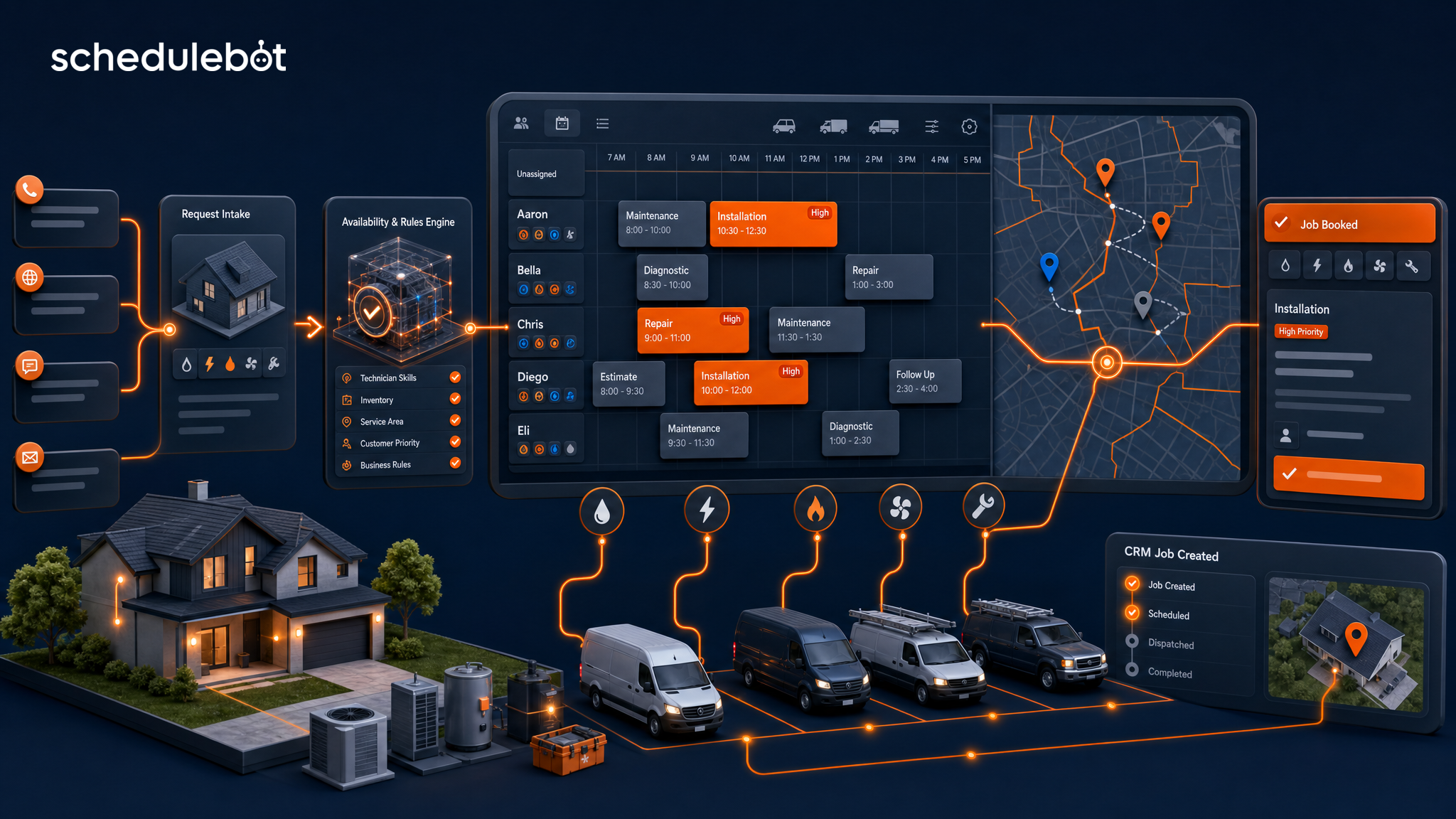
Field service scheduling software helps home service companies answer customer demand, match each request to the right booking rules, and create scheduled jobs in the CRM or dispatch board. For HVAC, plumbing, electrical, roofing, garage door, and other contractor teams, the real value is not a prettier calendar. It is turning calls, chats, forms, and texts into bookable work without forcing the office to rebuild every lead by hand. HVAC teams can see what that looks like in peak season in our guide to HVAC appointment scheduling software.
Most contractors already have some kind of schedule. They may have a dispatch board in ServiceTitan, Housecall Pro, Service Fusion, JobNimbus, or another field-service system. They may also have CSRs, dispatchers, online forms, chat widgets, after-hours answering, and paid lead sources all feeding the same office team.
The problem is that those pieces often do not behave like one scheduling system. A homeowner fills out a form, but the office still has to call back. A missed call becomes a voicemail instead of a booked job. A website chat captures a name, but not the job type or service area. A CSR takes good notes, but dispatch still needs the request translated into the right CRM fields.
Answer block: Field service scheduling software is a booking system that helps contractors qualify customer requests, check service area and availability, apply job-type rules, and create appointments or leads in the CRM. For home service companies, the strongest systems connect calls, forms, chat, SMS, live availability, branch routing, priority rules, and dispatch-board job creation.
That definition matters because the category can mean very different things. Some tools are basic appointment calendars. Some are dispatcher planning tools. Some are route optimization products. Others are customer-facing scheduling layers that sit between inbound demand and the contractor's CRM.
Home service companies usually need the last version. The first mile of scheduling starts before dispatch ever sees the job. It starts when a customer says they have no cool air, a leaking water heater, flickering lights, a roof leak, or a stuck garage door. The system has to understand what the customer needs, where they are, how urgent it is, and whether the business can serve them.
Generic scheduling software is usually built around time slots. Contractor scheduling software has to be built around operational rules.
A 10 AM slot is not automatically bookable just because it appears open. The company still needs to know:
When a scheduler cannot answer those questions, it usually falls back to message taking. That may capture the lead, but it does not solve the operational work. The office still has to interpret the request, check rules, find a slot, call the customer, and enter the job.
Home service scheduling software should move a customer from intent to a clean scheduling outcome. That outcome may be a booked job, a routed lead, an emergency escalation, or a human handoff. The important part is that the system applies the company's rules consistently instead of dumping vague notes into a shared inbox.
At minimum, the software should support:
ScheduleBot is built around that workflow. AI Forms guide online scheduling instead of using static forms. AI Voice can answer overflow and after-hours calls. AI Chat helps website visitors move from question to booking. The goal is one consistent intake layer across the channels customers already use.
Live availability is where scheduling software becomes more than a request form. A request form asks when the customer would like service. Live availability helps decide what the company can actually offer.
For a contractor, availability can depend on branch hours, territory, service type, business unit, time window, daily capacity, emergency rules, holidays, blocked times, and CRM availability. In deeper workflows, it may also depend on technician or crew constraints.
That is why a home service scheduler should avoid making promises it cannot keep. If the job is outside the service area, the system should stop or route it. If the issue needs human review, it should create a clean lead instead of forcing a bad appointment. If the customer has an urgent request, it should use priority rules instead of treating the job like a routine tune-up.
This is especially important for companies with multiple branches or territories. A customer in one ZIP code may belong to a different office than a customer across town. The right scheduling software should reflect how the business actually operates.
CRM scheduling automation matters because a booking is not useful until it reaches the system the team works from. For many contractors, that is the dispatch board inside ServiceTitan, Housecall Pro, Service Fusion, JobNimbus, or a similar platform.
Without CRM job creation, scheduling software often creates duplicate work. The customer thinks they requested an appointment, but the CSR still has to copy information into the CRM, pick job codes, assign the right category, and confirm the time. Every handoff adds delay and error.
With CRM-connected scheduling, the software can collect the customer's issue, contact details, address, urgency, selected job type, appointment timing, and source information, then push a cleaner record into the operating system. That gives dispatch and the office a better starting point.
| Need | Basic scheduler | Home-service scheduling software |
|---|---|---|
| Shows calendar slots | Yes | Yes, with company rules |
| Checks service area | Usually no | Yes, by ZIP, territory, or branch |
| Adapts by job type | Limited | Yes, for repairs, estimates, emergencies, and tune-ups |
| Handles priority | Limited | Yes, with urgency and after-hours logic |
| Creates CRM jobs or leads | Often no | Yes, in supported workflows |
| Works across calls, forms, chat, and SMS | Usually separate | Yes, as a connected intake layer |
Owners, operations managers, office managers, call center leaders, dispatch managers, and marketing managers should evaluate field service appointment scheduling around revenue and operational fit, not just calendar features.
The strongest systems help the company convert more of the demand it already has. That matters for teams spending on Google LSA, PPC, SEO, referrals, trucks, direct mail, and repeat customer marketing. More traffic is expensive. Better scheduling conversion turns existing demand into more jobs.
ScheduleBot is field service scheduling software built specifically for home service companies. It is designed to answer and qualify customers from calls, forms, chat, and texts, then move qualified requests toward booked jobs in the CRM when the workflow supports it.
The product is not just a public calendar. ScheduleBot is built around the rules that matter to contractors: live availability, service area, branch and territory routing, job type, business unit, urgency, priority, after-hours behavior, customer status, and CRM job creation.
That makes it useful for HVAC, plumbing, electrical, roofing, garage door, and similar teams that already have inbound demand but lose opportunities during busy periods, after hours, or manual handoffs. It also supports the office team by handling repetitive first-mile intake while leaving complex situations to humans.
This article is part of ScheduleBot's broader guide to home service answering service and scheduling software. That pillar covers how calls, chat, forms, SMS, and CRM scheduling connect into one lead-to-booked-job workflow.
Field service scheduling software should not be judged by whether it has a calendar. It should be judged by whether it helps the business book more qualified jobs with less manual cleanup.
For home service companies, that means live availability, service-area checks, job-type logic, branch and territory routing, priority handling, and CRM-connected job creation. When those pieces work together, scheduling becomes a revenue system instead of an administrative task.
ScheduleBot gives contractors that scheduling layer across AI voice, chat, forms, SMS, follow-up, and CRM-connected booking. It helps protect marketing spend, support CSRs, and turn more customer intent into real work on the board.
Field service scheduling software helps companies route customer requests into real appointment windows by using job type, service area, technician or crew capacity, priority, and CRM rules. For home service contractors, the best systems do more than show a calendar; they turn inbound calls, chats, forms, and texts into booked jobs.
Home service companies should look for live availability, branch and territory routing, service-area validation, job-type logic, urgency handling, CRM job creation, and clear lead recovery. The system should support CSRs and dispatchers instead of creating another disconnected inbox.
Yes, when the scheduling platform is integrated with the contractor CRM. ScheduleBot supports CRM-connected booking workflows for systems such as ServiceTitan and Housecall Pro, so qualified requests can become jobs or clean leads without manual re-entry.
No. Contractor scheduling software is strongest when it works across phone calls, website chat, online forms, SMS, missed calls, and after-hours demand. Customers choose different channels, but the business still needs one consistent path to qualified booked work.
No. ScheduleBot is designed to support CSRs, dispatchers, and office managers. It handles repetitive intake, overflow, after-hours coverage, and CRM scheduling tasks so humans can focus on exceptions, complex customers, reschedules, and judgment calls.